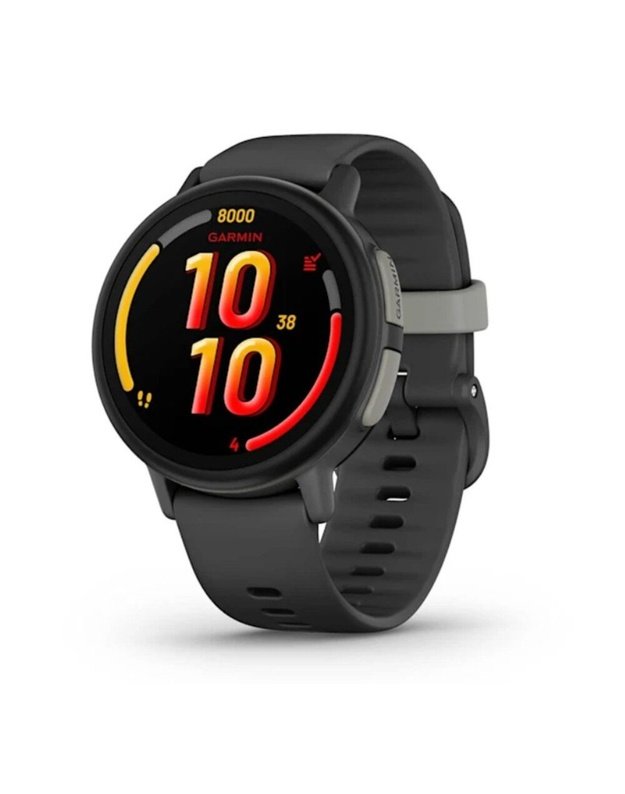
Don't get your kids used to a smartphone too early. With the Bounce 2 kids smartwatch and its calling and text messaging1 you can not only stay in touch with your child but also help keep them active.
Track your child's location through the Garmin Jr.™ smartphone app and get notifications when they enter or leave a parent-defined zone. You can even request to be notified when your child moves from their current location.
Use the Garmin Jr. app to call your child's Bounce1 and send or receive voice messages. Replies can also be received as voice messages with transcriptions.
With an active subscription, you can use the Garmin Jr. app to send text messages to your child's Bounce 2 smartwatch. Kids can compose their own messages and, using the full-size on-device keyboard, reply to parent-approved contacts or the family in group messages, and add emojis or sound emojis.
Hold off on the smartphone and give your child a connected smartwatch1 instead, so you can easily communicate with them and see their location. There's no need to change your mobile carrier, as your Bounce 2 smartwatch subscription is managed by Garmin. Choose the plan that suits you.
If your child needs help and the assistance feature is enabled, you can be sure that family contacts will receive a call and a message with a LiveTrack™ location sharing link to your child's current location3.
Built-in sports apps use GPS, so your child can track running, walking and cycling activities. They can also record pool lengths swum or other activities. You can also monitor daily step counts and make sure your kids get enough rest with sleep tracking4.
Kids can use voice commands to call their parents, start a timer, check the weather forecast and more.
With engaging designs, kids can customise watch themes and watch faces, and even create their own.
Your child can “check in” at their location, which sends a notification to the Garmin Jr. app1.
Use the Garmin Jr. app to assign parents or guardians who will have all the permissions needed to contact your child, locate them or manage their Bounce.
Kid-friendly weather updates with a simple forecast and feels-like temperature1 help them dress for the weather. Alerts about extreme weather conditions, such as high heat, are also provided.
Using the Garmin Jr. app, you can enable school mode or a do-not-disturb mode while your child sleeps, additionally including silent or restricted silent modes, so your child's smartwatch doesn't distract them during lessons or at night.
Your child can use a stopwatch on their wrist or set alerts or timers to remind them when it's time to do homework or practise the piano.
Your child's Bounce 2 smartwatch also includes fun games they can play during parent-approved times. Kids can enjoy Copycat and quick math games.
Go on educational adventures, learn about famous places and uncover secrets using the Garmin Jr. app.
The more active minutes kids log, the more chances they get to take quizzes, learn exercises and play quick-tap or matching games in the Garmin Jr. app.
When they reach daily activity goals, kids are also rewarded with gems that let them unlock photos in a memory album with moments from their adventures in the Garmin Jr. app.
Bounce 2 teaches kids basic exercises with workout cards in the Garmin Jr. app, including downward dog, alternating forward lunges, plank and more.
Turn on kid mode in the Garmin Jr. app and give your child limited access so they can view and check off completed tasks and see the latest task in the app adventure.
In the Garmin Jr. app, parents can view activity, tasks, sleep, chores and other data.
Assign tasks and set the value of virtual coins. Kids can check off completed chores on their Bounce 2. Coins earned in the app can be exchanged for rewards of your choice.
Once you assign tasks and set alerts, an icon will appear on your child's smartwatch letting them know what needs to be done.
Connect with your child's friends and other families in the Garmin Jr. app. Interact with them and compete weekly in step challenges with multiple families.
| Technical specification | |
|---|---|
| Akselerometras | Yra |
| Ambient light sensor | Yra |
| Atmintis / istorija | 4 GB |
| Battery life | Iki 2 d. |
| Bluetooth jungtis | Yra |
| Ekrano dydis, coliais | 1.2" |
| Ekrano skiriamoji geba | 390 x 390 |
| Galileo | Yra |
| GLONASS | Yra |
| GPS receiver | Yra |
| Integruotas mikrofonas su garsiakalbiu | Yra |
| Water resistance | 5 ATM |
| Wi-Fi | Yra |
| Screen type | AMOLED |
| Touchscreen | Yra |
DPD courier to your door – from €4.22.
DPD parcel lockers and pickup points – from €3.62.
Items from our own warehouse are delivered within 2 business days, items from our partners’ warehouse within 3–4 business days. Orders placed on a business day before 14:00 are processed the same day. The estimated date is shown next to the “Add to cart” button.